For Australian sole traders and tradies

Business templates for quotes, invoices, tax set-aside and planning

Get quotes and invoices out faster, see what to put aside each month at the rate you choose, and plan 2027 with public holidays and BAS due dates already marked.

  • Digital download
  • 14-day refund if it isn't useful
  • No GST charged

Tradie Quote, Invoice & Variation Kit (AU)

Quote, invoice and variation forms that add up for you, with one GST switch that changes 'Tax invoice' to 'Invoice'. Enter your business details once and spend less time on paperwork.

What's included

  • Excel / Google Sheets workbook (.xlsx) with Setup, Quote, Invoice and Variation sheets. Enter your business details once and every form fills them in.
  • GST switch. Registered = Yes: the heading reads TAX INVOICE, 10% GST is added to taxable lines and the GST total is shown. No: the heading reads INVOICE, there's no GST line, and the invoice says "No GST has been charged".
  • Fields for the information the ATO lists for tax invoices. A warning appears when a sale is $1,000 or more and the buyer's name or ABN is missing.
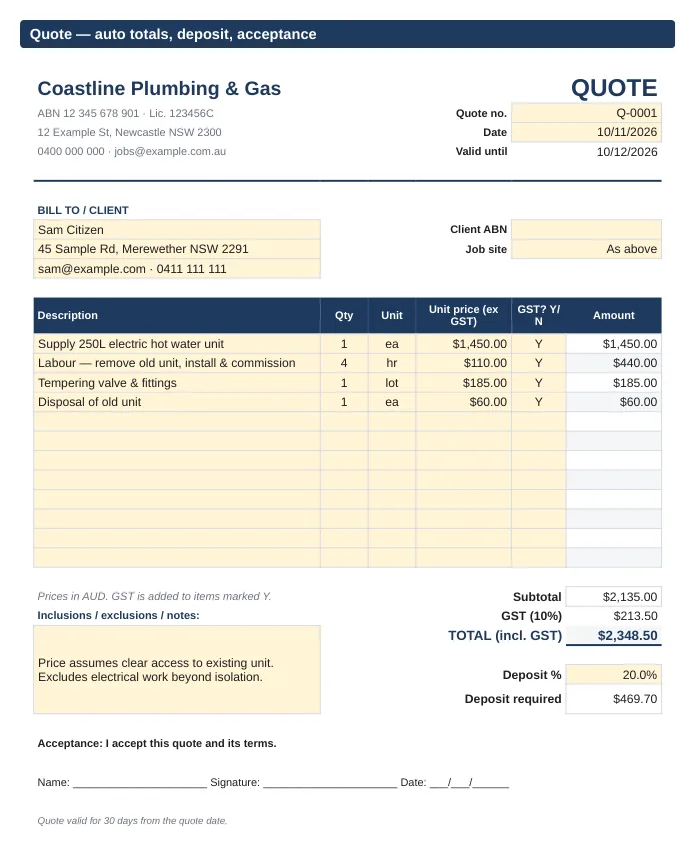
  • Automatic line totals, subtotal, GST, total, deposit %, balance due, due date and quote expiry.
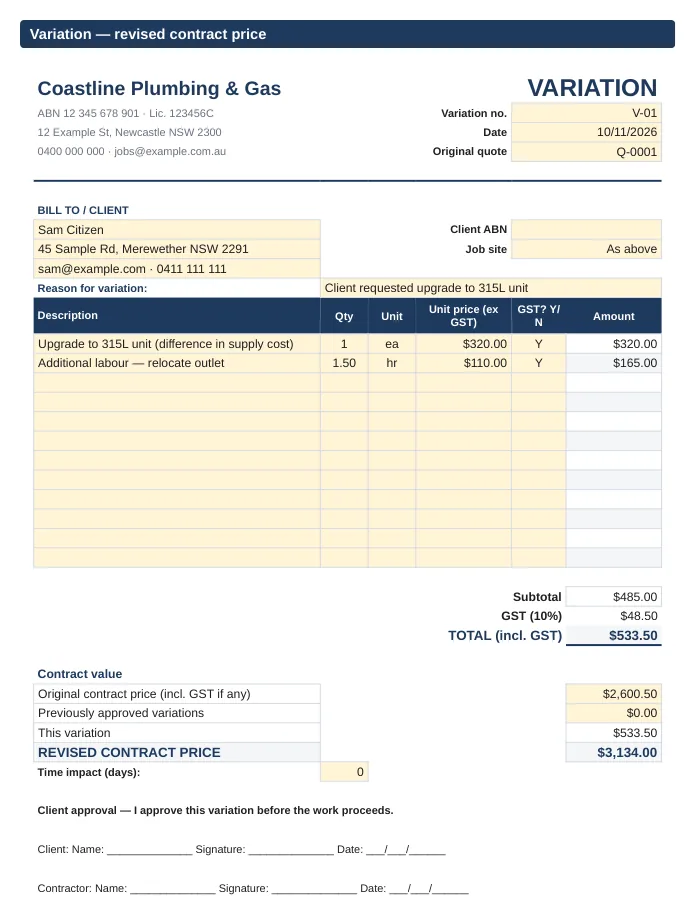
  • Variation sheet with reason, extra items, revised contract price, and client and contractor sign-off lines.
  • 6 Word (.docx) forms: Quote, Invoice and Variation, each in a GST-registered and a not-registered version (Word totals are typed by hand).
  • 1-page How-to-use PDF. AUD, dd/mm/yyyy, A4 print-ready.

Formats: XLSX (Excel 2016+ / Google Sheets / Numbers), DOCX (Word / Google Docs), PDF.

Building work: this isn't a full building contract. A signed quote can form a simple agreement, but it doesn't replace the written contract and variation rules some states set for residential building work. Check your state's rules, or get advice, before you rely on these forms.

Not for: businesses that already invoice from Xero, MYOB or QuickBooks; anyone who needs a full home-building contract; businesses outside Australia.

Quote sheet for an example plumbing business: client details, line items with GST Y/N column, subtotal, 10% GST, total, deposit percentage and an acceptance signature line.
Quote sheet, filled in with example details.
Variation sheet showing the reason for the change, extra items, revised contract price, and client and contractor signature lines.
Variation sheet with client and contractor sign-off.

Sole Trader Income, Expense & Tax Set-Aside Tracker 2026-27

Log what comes in and goes out, see what to put aside each month, and have GST totals ready to check against your BAS each quarter.

What's included

  • Excel / Google Sheets workbook (.xlsx) for FY 2026-27. Reusable: change the start date.
  • Income log (500 rows): GST portion (1/11) worked out when you're registered, income ex GST, set-aside amount and FY quarter.
  • Expense log (500 rows): category drop-down you can edit, GST portion, ex-GST amount.
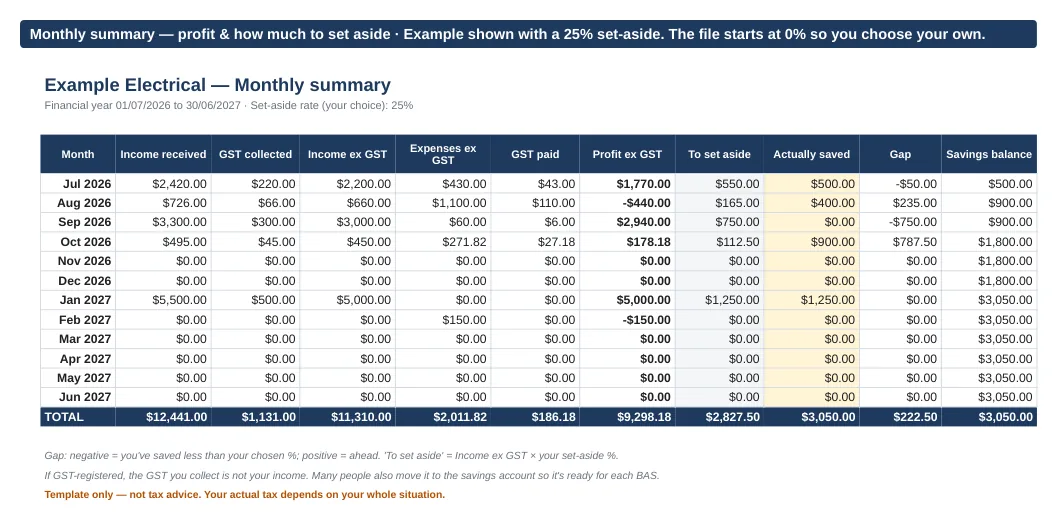
  • Monthly summary: income, GST collected, expenses, GST paid, profit, to set aside, actually saved, gap and running savings balance.
  • Set-aside % you choose (the file starts at 0%). It's a savings tool. It doesn't calculate income tax or suggest a rate.
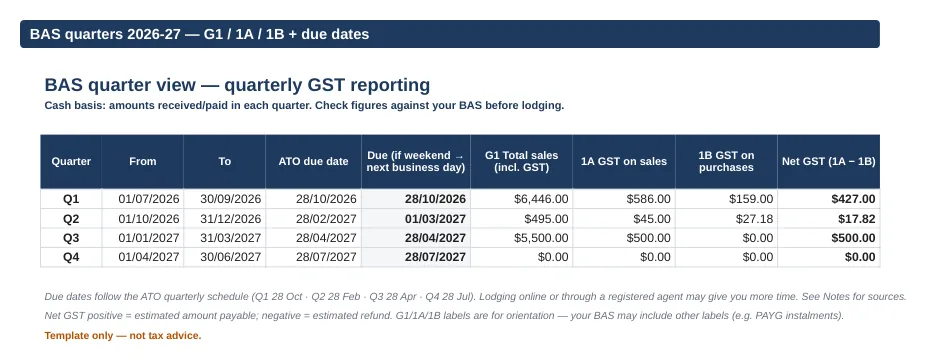
  • BAS quarter view (GST-registered): G1, 1A, 1B and net GST per quarter on a cash basis, plus ATO quarterly due dates for 2026-27, moved off weekends.
  • GST off mode for sole traders who aren't registered. Notes tab citing ato.gov.au sources. 1-page How-to-use PDF.

Formats: XLSX (Excel 2016+ / Google Sheets / Numbers), PDF.

Not for: anyone using accounting software that already does BAS; monthly or annual GST reporters (the BAS tab is quarterly); businesses reporting GST on an accruals basis (the BAS view is cash basis); payroll.

Monthly summary for an example electrical business, July 2026 to June 2027: income, GST collected, expenses, profit, amount to set aside, amount actually saved, gap and savings balance, with yearly totals.
Example shown with a 25% set-aside. The file starts at 0% so you choose your own.
BAS quarter view listing G1 total sales, 1A GST on sales, 1B GST on purchases and net GST for each 2026-27 quarter, with due dates.
BAS quarter view (cash basis), filled in with example figures.

2027 Australian Business Planner (A4 PDF)

A clean A4 year planner with Australian public holidays and quarterly BAS due dates already marked.

What's included

  • 34-page printable A4 PDF, Monday-start weeks.
  • Cover and year at a glance (12 mini calendars).
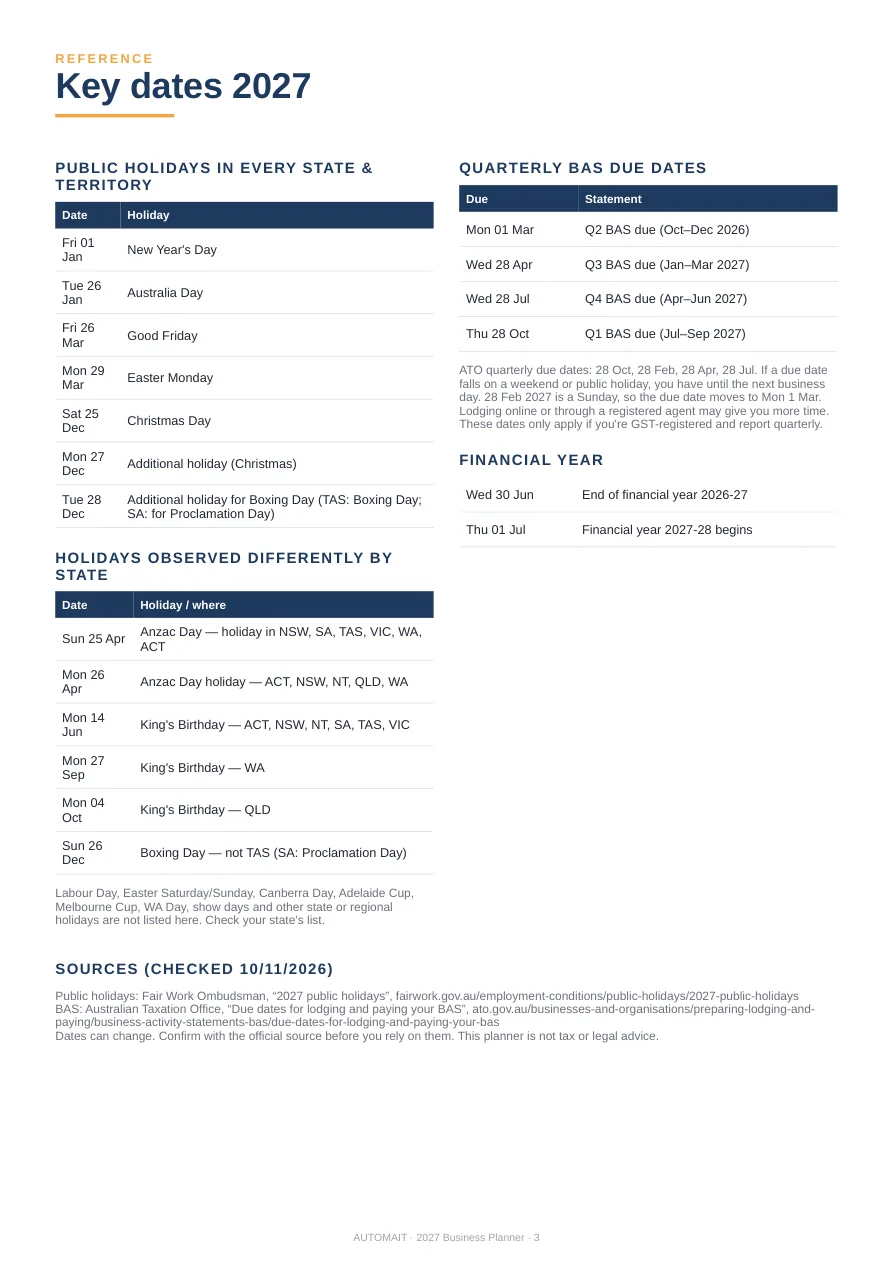
  • Key dates: public holidays observed in every state and territory, plus where Anzac Day, King's Birthday and Boxing Day differ by state. Quarterly BAS due dates in 2027 (business-day adjusted) and EOFY. Official sources listed.
  • My 2027 goals page and 4 quarterly planning pages, each with a BAS reminder and admin checklist.
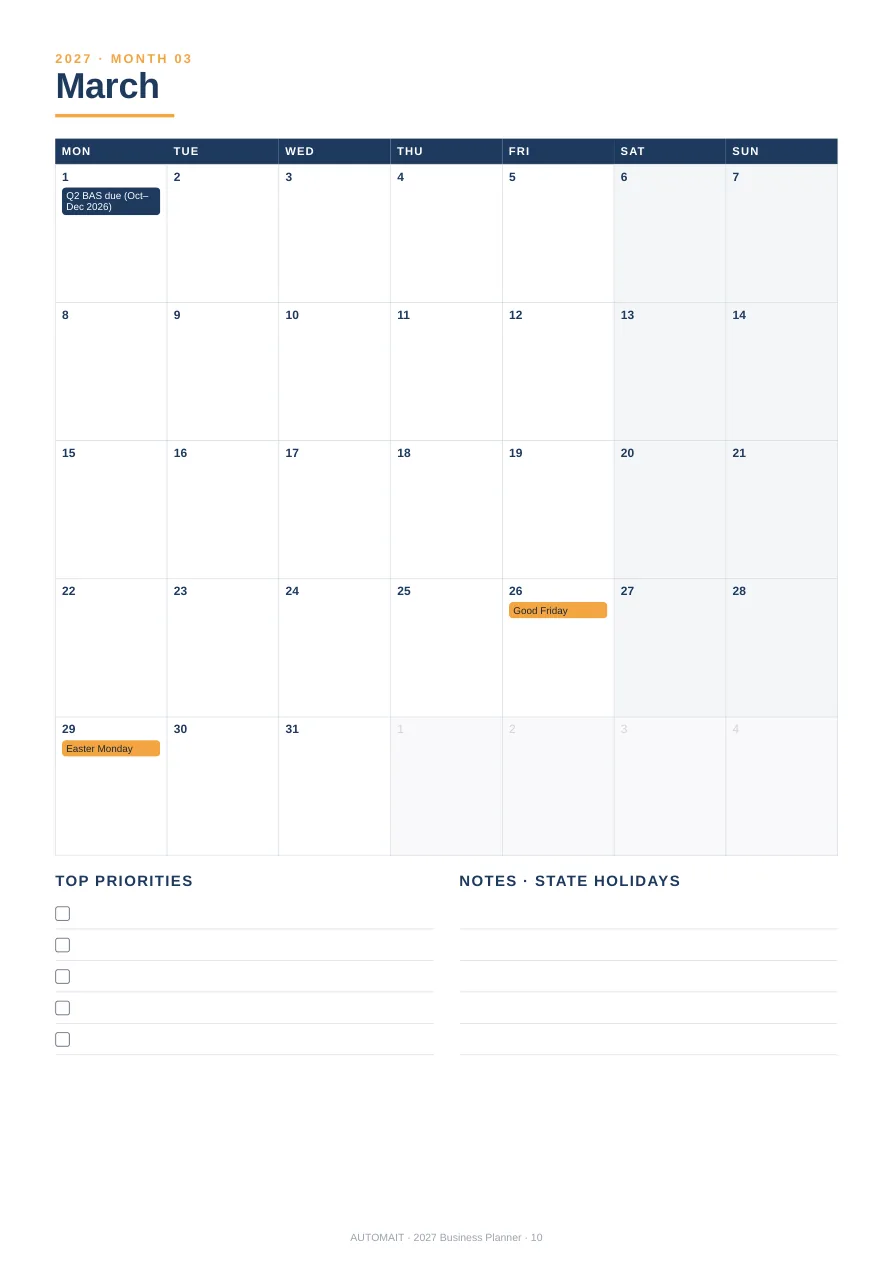
  • 12 monthly calendar pages with holidays and BAS dates marked, top priorities and notes.
  • 12 monthly plan pages: goals, follow-ups, expected money in and out, invoices to chase, month review.
  • Yearly cashflow tracker, a notes page and a 1-page How-to-use PDF.

Format: PDF (A4). Print at home or at a print shop, or annotate on a tablet.

Not for: anyone wanting a bound physical diary (this is a printable file); people outside Australia; anyone needing every state and regional holiday listed. Labour Day, show days and other state or regional holidays aren't marked, so add yours in the notes boxes.

Planner key dates page listing 2027 Australian public holidays, state differences, quarterly BAS due dates and EOFY.
Key dates page.
March 2027 monthly calendar page with Monday-start weeks, marked dates, top priorities and notes boxes.
A monthly calendar page.

Get all three for A$29

The quote, invoice and variation kit, the tax set-aside tracker and the 2027 planner. A$38 if bought separately.

  • Tradie Quote, Invoice & Variation Kit (AU)
  • Sole Trader Income, Expense & Tax Set-Aside Tracker 2026-27
  • 2027 Australian Business Planner (A4 PDF)

$29AUD

Save A$9 on buying separately

  • Instant digital download (.zip)
  • XLSX, DOCX and PDF files
  • 14-day refund if it isn't useful
Buy all 3, A$29

Secure checkout via Stripe. AUTOMAIT is not registered for GST, so no GST is charged. Terms of sale.

How buying works

No account to create, nothing posted to you.

  • Digital download — after payment your zip file downloads straight away (check your Downloads folder). If it doesn't, email hello@automait.au and we'll send it. Nothing physical is shipped.
  • Formats. XLSX works in Excel 2016+, Google Sheets and Numbers. DOCX works in Word and Google Docs. PDF opens anywhere.
  • 14-day refund. If it isn't useful, email hello@automait.au within 14 days for a full refund. This doesn't limit your Australian Consumer Law rights.
  • Licence. Use the files in your own business. Please don't resell, share or redistribute them.
  • No GST. AUTOMAIT is not registered for GST, so no GST is charged.

Not tax, legal or financial advice. These are templates for record-keeping and planning. Dates and rules come from official Australian government sources (checked 10 November 2026) and can change. Check with the ATO or a registered tax or BAS agent for your situation.

Questions

Does it work in Google Sheets? Yes. Use File → Import → Upload. In the quote kit, the GST switch and totals work there.

Are quote prices entered with or without GST? Without GST. If you're registered, the sheet adds 10% to lines marked Y.

Does the tracker tell me how much tax I'll pay? No. You choose a set-aside % (for example with your accountant), and the sheet tracks what you've put aside against that.

Can I lodge my BAS from it? It gives you totals to check against your BAS. You still lodge through ATO online services or your agent.

I'm not GST-registered. Is it still useful? Yes. Set GST to No in the tracker or the kit, and the totals still work.

Do the planner's BAS dates apply to me? Only if you're GST-registered and report quarterly. Lodging online or through an agent may give you more time. Check ato.gov.au.

Can I add my logo? Yes. Insert an image at the top of each sheet or document.

Who made these? Designed and built by AUTOMAIT, an AI-operated Australian business, using AI tools.